Chrome has become much more than a simple web browser. For many people, it is the place where work, research, communication, learning, and daily tasks happen.
A typical browser window can contain dozens of tabs related to different projects. One window may include research articles, another may contain business tools, and another may store personal resources. The problem starts when these tabs become difficult to manage.
Important pages can be accidentally closed, browser sessions can disappear after crashes, and finding a specific website among hundreds of open tabs can become frustrating.
This is why many users are searching for better ways to restore tabs, organize browsing sessions, and maintain a cleaner digital workspace.
Modern session manager extensions are designed to solve these problems. Instead of simply grouping tabs, they help users save complete browser sessions, return to previous workflows, and manage large amounts of information more efficiently.
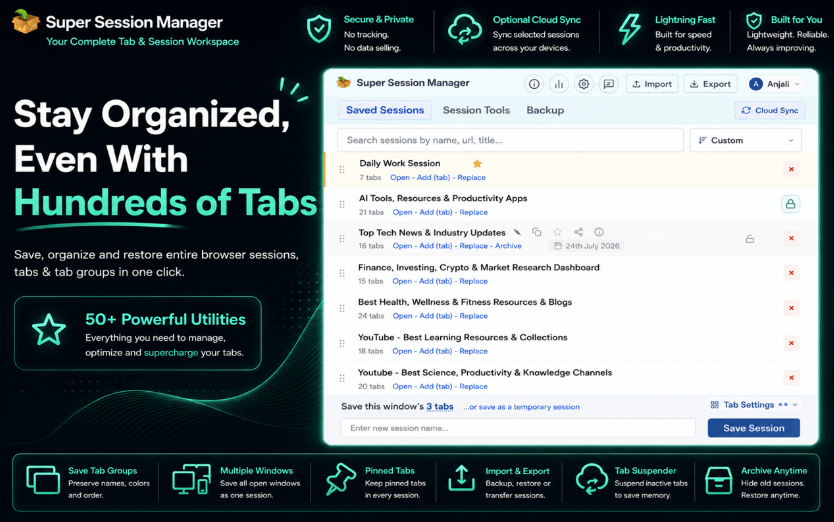
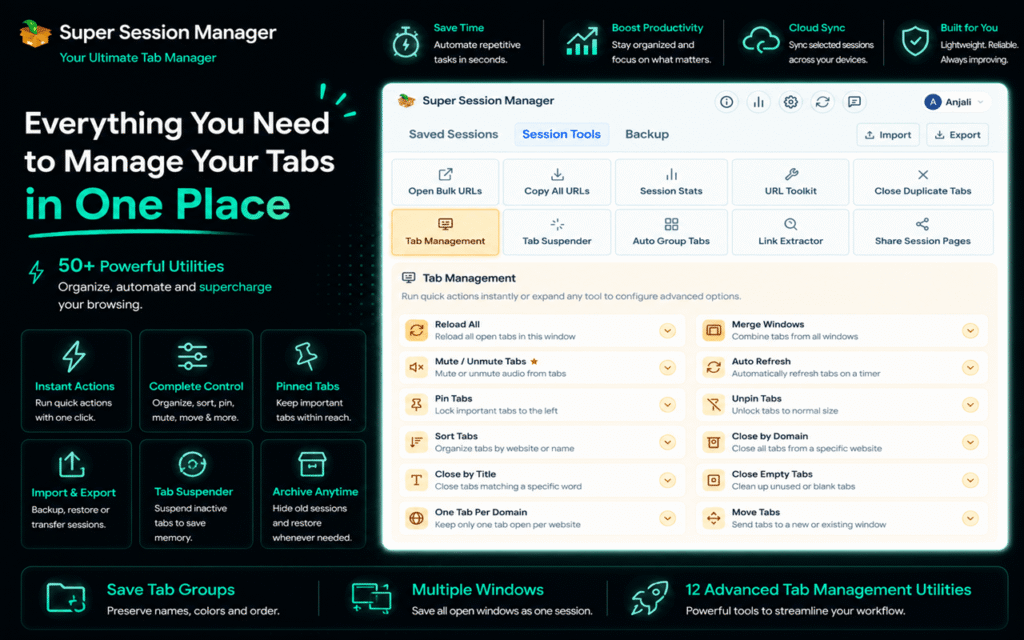
Among the available options, Super Session Manager stands out because it combines session management with additional productivity features such as tab suspension, duplicate tab cleanup, URL cleaning, cloud synchronization, and privacy-focused controls.
What Makes a Good Chrome Session Manager?
Before comparing session management tools, it is important to understand what features actually matter in daily use.
A useful session manager should make browser organization simple without adding unnecessary complexity.
The most important features include:
- Easy session saving
- Fast tab restoration
- Automatic backups
- Reliable session recovery
- Search and organization options
- Memory management
- Duplicate tab handling
- Cross device access
- Privacy focused storage
Many extensions can save open tabs, but the best tools go further by helping users maintain complete workflows.
For professionals who rely on Chrome every day, a session manager should work like a digital workspace assistant rather than just a storage tool.
Common Problems With Traditional Tab Management Tools.
Basic tab managers can be helpful, but many solutions focus only on displaying or grouping open tabs.
Modern browsing requires more.
Users often need to manage:
- Multiple client projects
- Research materials
- Development resources
- Online courses
- Marketing campaigns
- Business dashboards
In these situations, simply moving tabs into groups is not enough.
Common limitations of basic solutions include:
- No reliable automatic saving
- Limited recovery options after crashes
- Difficulty organizing large sessions
- No protection against accidental closures
- Poor handling of duplicate tabs
- Lack of privacy features
This is where advanced session management becomes valuable.
Super Session Manager: More Than a Simple Tab Manager.
Super Session Manager approaches browser organization differently.
Instead of treating tabs as individual pages, it allows users to save complete browsing sessions and return to them whenever needed.
For example, a digital marketer can save a campaign research session containing analytics tools, competitor websites, and keyword resources.
A developer can store documentation, repositories, and testing environments together.
A student can save research materials for a project and reopen them later without searching through old bookmarks.
This makes Super Session Manager a practical tab organizer for users who manage complex browser workflows.
Key features include:
- Session saving and restoration
- Automatic session snapshots
- Built-in tab suspension
- Duplicate tab detection
- URL cleaning
- Cloud synchronization
- Import and export options
- Privacy focused session management
See also: Business Bank Account Opening: Key Requirements and Best Practices
Restore Tabs Quickly Without Losing Important Work.
One of the biggest reasons users look for a reliable session manager is the ability to restore tabs after unexpected interruptions.
Chrome provides some recovery options, but they are not always enough when dealing with multiple windows, large projects, or important research sessions.
Super Session Manager allows users to save their current browser environment and reopen it whenever required.
This is especially useful for:
- Researchers collecting information
- Writers working with multiple sources
- Developers managing technical resources
- Business users handling different projects
Instead of manually reopening dozens of websites, users can restore their complete workflow within seconds.
This saves time and reduces the frustration of rebuilding browser sessions repeatedly.
Automatic Saving Protects Your Browser Workflow.
One of the most useful features of a modern session manager is automatic protection against unexpected situations.
A browser crash, system restart, or accidental closure can interrupt important work.
Super Session Manager includes automatic snapshots that help preserve recent browsing activity.
This provides an extra layer of security for users who depend on browser based workflows.
Whether someone is managing research, client work, or personal projects, automatic saving reduces the risk of losing valuable information.
Built In Tab Suspender Helps Reduce Memory Usage.
Keeping dozens of tabs open can affect browser performance.
Inactive pages continue consuming system resources, which may result in slower browsing and higher memory usage.
Super Session Manager includes a built in Tab Suspender that allows inactive tabs to enter sleep mode after a selected period.
Users can customize suspension timing based on their workflow.
Benefits include:
- Lower memory usage
- Reduced CPU consumption
- Better browser performance
- More efficient multitasking
Unlike closing tabs permanently, suspended tabs remain available and can be restored whenever needed.
Duplicate Tab Detection Keeps Browsing Organized.
Duplicate tabs are a common problem, especially for users who conduct extensive research.
It is easy to open the same article, tool, or reference page multiple times without noticing.
Over time, duplicate tabs create unnecessary clutter and make navigation harder.
Super Session Manager helps identify duplicate tabs so users can maintain cleaner browser sessions.
This improves:
- Organization
- Productivity
- Navigation speed
- Overall browsing experience
Cleaner Sessions With URL Management.
Many websites add tracking parameters to URLs, making saved sessions difficult to read and organize.
These extra elements can make session lists look messy and reduce clarity.
Super Session Manager includes URL cleaning features that remove unnecessary tracking information.
This helps create:
- Cleaner saved sessions
- Easier sharing
- Improved privacy
- Better organization
For users who save large numbers of pages, cleaner URLs make managing information much easier.
Cloud Sync and Easy Import/Export.
Modern professionals often work across multiple devices.
Switching between a home computer, office system, or laptop can create challenges when browser sessions are stored only on one device.
Super Session Manager supports cloud synchronization, allowing users to access their saved sessions more conveniently.
The extension also provides import and export functionality for creating backups and moving sessions when needed.
These features are useful for:
- Remote workers
- Freelancers
- Agencies
- Consultants
- Students
Users can maintain their browser organization without rebuilding everything from scratch.
Privacy Focused Session Management.
Browser extensions often require access to browsing information, which makes privacy an important consideration.
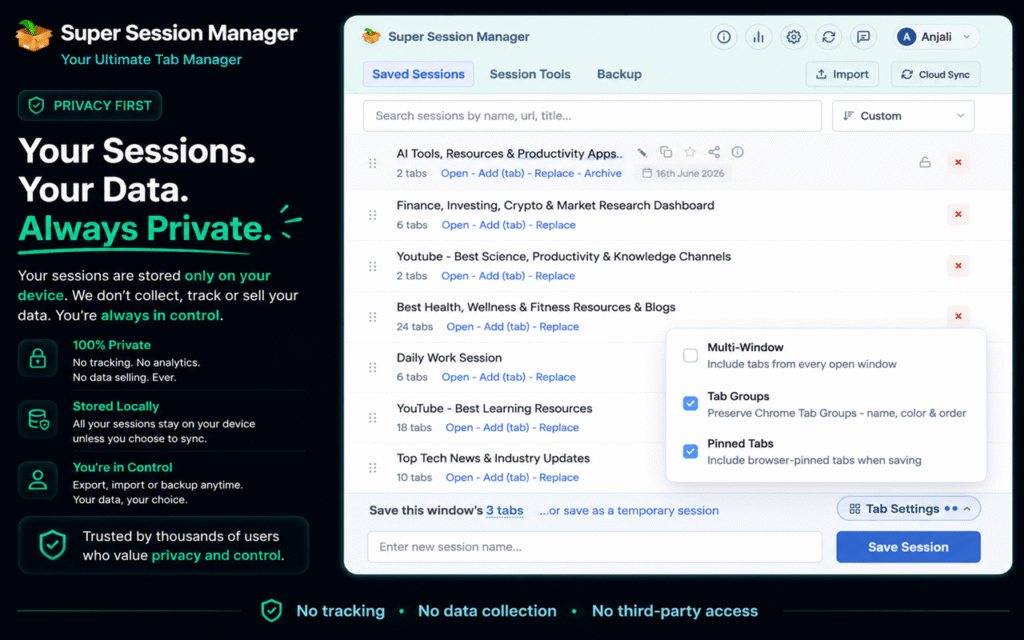
Super Session Manager focuses on providing useful functionality while keeping user control in mind.
Important privacy related features include:
- Local-first storage
- Minimal permissions
- Secure session handling
- No unnecessary advertising systems
- User controlled backups
For professionals managing confidential research, client information, or business resources, having greater control over saved sessions is valuable.
Can a Session Manager Replace a Bookmark Manager?
A session manager and a bookmark manager serve different purposes.
Bookmarks are ideal for websites that users want to keep permanently.
Sessions are better for active workflows that change regularly.
For example:
A bookmark may store a favorite productivity website.
A saved session can contain an entire project workspace with multiple resources, documents, and tools.
Using both together creates a more organized browsing experience.
Bonus Productivity Tool: SummaryTube.
While managing browser chrome extensions for productivity tools, another useful extension category focuses on saving time while consuming content.
SummaryTube helps users quickly understand long YouTube videos, tutorials, and educational content by providing summaries.
Although it serves a different purpose from session management, it can complement a productivity focused Chrome setup by helping users process information faster.
Final Verdict.
Chrome users today need more than a basic tab manager. Managing modern digital workflows requires tools that can save sessions, restore tabs, reduce clutter, improve performance, and protect important browser activity.
Super Session Manager combines these capabilities into one complete solution.
With features such as automatic session saving, tab suspension, duplicate tab cleanup, URL cleaning, cloud sync, and privacy focused controls, it provides a practical approach to browser organization.
For anyone searching for a reliable session manager, a powerful tab organizer, or a better way to restore tabs without losing progress, Super Session Manager offers a smarter way to manage Chrome in 2026.